Fluency (CIT11)
Final Exam Fall 2006
This is an open note/open book final exam - it is also an individual project. If you have any questions, e-mail me to clarify or make an appointment to see me or in the case of Old Colony students, talk to your teacher. The completed exam should be turned in one week from today on Monday, December 16th..
I do not tend to view final exams as a time to test you, but rather as a time
for you to review and solidify your knowledge and to gain some new knowledge.
Last chance to learn the course material and then some... So, here goes...
Problem #1:
Read the following articles:
http://www.virtualchase.com/howto/assess_quality.html
http://www.virtualchase.com/quality/checklist.html
http://www.virtualchase.com/articles.shtml
http://www.washingtonpost.com/ac2/wp-dyn?pagename=article&contentId=A9650-2000May16¬Found=true
Follow some of the links and summarize the information they convey about searching effectively and credibly.
If you are in the health care area at BCC, look up a health issue on the web that you know something about and evaluate five of the sources that came up in your search as to whether you find the sites credible (you need to give me the addresses you evaluated). Use the information you gained from the articles and your text to help you determine the credibility.
For other students, look up a issue on the web that you know something about and evaluate five of the sources that came up in your search as to whether you find the sites credible (you need to give me the addresses you evaluated). Use the information you gained from the articles and your text to help you determine the creditability.
Problem #2:
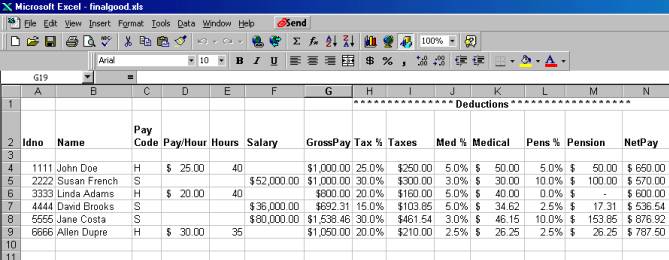
Answer the questions about the spreadsheet shown on the next page
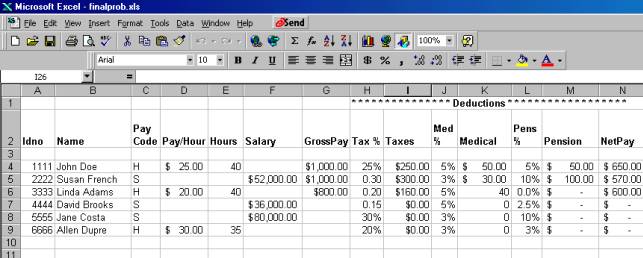
First I am showing you the spreadsheet that I want to end up with. Then I am showing you the same spreadsheet with some problems. I want you to make sure that you make the corrections so you end up with a spreadsheet like the first one.
Now I am going to show you the messed up version.
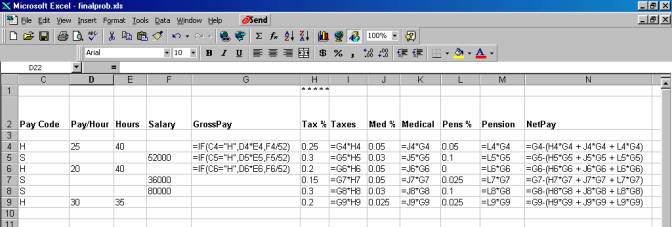
Next I will show you the formulas in the background. To do this I click on tools/options and then click on formulas.
The gross pay formula in G4 is =IF(C4="H",D4*E4,F4/52)
The net
pay formula is =G4-(H4*G4 + J4*G4 + L4*G4)
See the rest of the formulas in
the screen shot below.
Note that there is also formatting
involved. Columns with dollar
information is formatting for currency and formulas with percents is formatted
for percent.
Here is what Microsoft says about using IF: The IF worksheet function
“Suppose that your company determines sales bonuses on a
sliding scale, awarding either 10 percent or 15 percent, based on the invoice
amount. To determine which one of two values to use, based on a condition that
is either true or false, use the IF worksheet function.
The IF worksheet function returns a bonus of either 10% or
15%, based on the invoice amount.
The IF worksheet function checks a condition that must be
either true or false. If the condition is true, the function returns one value;
if the condition is false, the function returns another value. The function has
three arguments: the condition you want to check, the value to return if the
condition is true, and the value to return if the condition is false.
=IF(logical_test,value_if_true,value_if_false)
For Suyama's $8,000 invoice, the function (in cell C4) looks
like this:
=IF(B4<10000,10%,15%)
If the invoice amount is less than $10,000 (the logical_test argument), the bonus is 10 percent (the value_if_true argument). If the invoice amount is $10,000 or greater, the bonus is 15 percent (the value _if_false argument).” Microsoft Help
Problem #3: Your book covers how to debug. You have just debugged the program above. Explain to me the steps you take in debugging an Excel problem.
Problem #4: Searching the Internet. For each of these use a different search
engine and tell me the search you entered and the site you choose and why you
chose that site.
- First, find a list of search engines that analyzes their effectiveness.
- I want to buy a recorder to record my lectures. Find a site that will help me choose which recorder to buy.
- I want to buy a headphone that will let me block noise. Find a site that gives me recommendations on which headphone to buy.
- Please find reviews of Blue Man Group, which is playing in Boston.
- I want to buy an organic blanket that is not wool. Please find me a blanket that I can buy.
- I want to find an explanation of rounding and truncating in JavaScript.
- I want to find an explanation of using the IF in Excel.
- Pick a topic on sound from the text and find a site that discusses it.
- Pick a topic on images from the text and find a site that discusses it.
- Look up whooping cough and find how it effects people, recommended cures and the duration of the illness.
Problem #5:
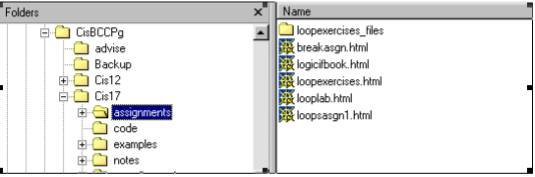
- CisBCCPg is directly under the root of the C drive. Write the path starting with C to get to the assignment looplab.html. Note that the highlighted folder/directory says assignments.
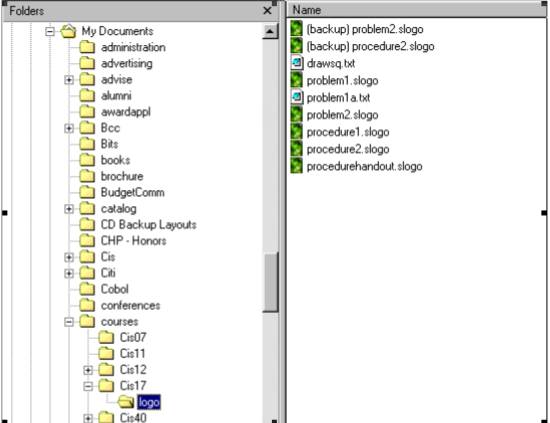
- MyDocuments is directly under the root of the C drive. Write the path starting with C to get to the file named problem1.slogo. Note that the highlighted folder/directory says logo.
.
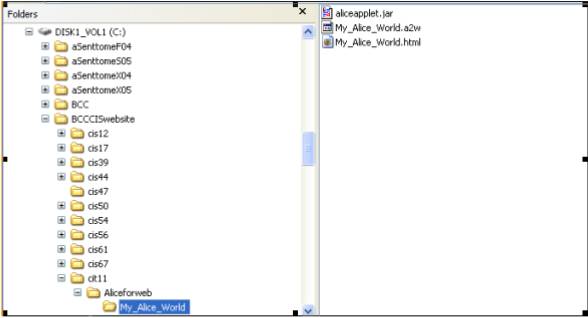
- Write the path to get to My_Alice_World.html starting with C:. Note that the highlighted folder/directory says My_Alice_World.